CQB Hell PC Controls
Keyboard and mouse habits that survive aggressive AI in tight Roblox maps.
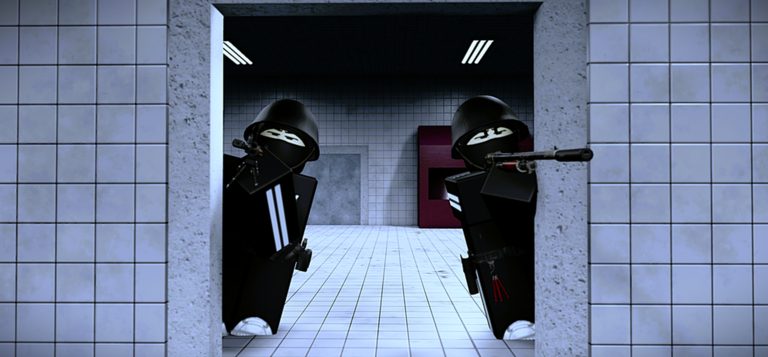
PC is the precision lane for CQB Hell. Mouse aiming lets you slice angles in randomized interiors while the keyboard keeps movement, utility, and medkits one tap away. This page covers practical Roblox shooter defaults, CQB-specific habits, and how to warm up before multiplayer sessions or bosses such as Allik. Cross-check Mobile Controls and Xbox Controls if you swap devices, and return to the Controls Hub for the shared fundamentals.
CQB Hell launched March 14, 2025 from Killart Studios. It is an online multiplayer PvE CQB shooter with aggressive AI, sandbox weapons, grenades, medkits, bosses, and a shooting range that also supports PVP. Play it from the official Roblox place. Exact key labels can vary slightly after UI patches, so confirm prompts on your HUD when a tutorial tip appears.
Core PC input model
Most Roblox FPS-style experiences map roughly as follows. Treat this as a baseline checklist, then verify in your session:
| Action | Common PC binding | CQB note |
|---|---|---|
| Move | WASD | Short strafes beat long sprints into unknown rooms |
| Look / aim | Mouse | Lower sensitivity helps doorway tracking |
| Jump / vault habit | Space | Use to clear low cover, not to silhouette yourself |
| Shoot | Left mouse | Controlled clicks over panic holding when recoil blooms |
| Aim down sights (if available) | Right mouse | Shoulder peeks before full commits |
| Reload | R | Reload behind cover after every contested room |
| Sprint | Shift | Sprint between cover, walk near corners |
| Crouch (if available) | Ctrl or C | Shrink profile at windows and railings |
| Interact | E or F | Doors, pickups, and range interactables |
| Weapon / item swap | Number keys or scroll | Pre-select nades before entry |
| Inventory / menu | Tab or M | Keep menus closed during pushes |
If your build remaps any of these, write your personal layout once so teammates calling “nade” or “heal” still match your fingers.
CQB movement on keyboard
Close-quarters maps punish wide mouse sweeps and constant sprint. Practice these PC habits:
- Jiggle and slice. Strafe with A/D while clearing a doorframe instead of walking straight in.
- Pre-aim head height. Aggressive AI often appears at common entry elevations—keep the crosshair ready before the model renders fully.
- Stop before the shot. Counter-strafing (tap the opposite key briefly) settles aim if the game favors accuracy while stationary.
- Sound discipline. On PC headphones, footstep and gunfire cues matter; do not bury them under music during boss attempts.
Random maps mean you cannot memorize one route forever. Train generic room-clear sequences: left-right sweep, check vertical openings, then commit.
Shooting and sandbox weapons
Community videos frequently showcase the Musket, D-44 Carbine, and G19B among other sandbox options. We will not invent damage, RPM, or magazine numbers. On PC, judge each gun in the shooting range:
- How many clicks before the sight climbs off a torso-sized target?
- How long does a reload leave you helpless in a doorway?
- Does the weapon prefer hip-fire panic or ADS discipline?
Grenades need a dedicated key you will never confuse with medkits. Practice cooking or quick throws only if the game supports those timings—never learn nade arcs for the first time on a live boss. Medkits should be bound where your off-hand fingers land without releasing WASD entirely when possible.
Mouse sensitivity and hardware tips
- Start medium-low. CQB rewards micro-adjustments more than 180 flicks.
- Disable mouse acceleration in Windows if you notice inconsistent peeks.
- Use a large enough mousepad for controlled horizontal sweeps through connected rooms.
- Cap frame rate to a stable value if micro-stutters throw off tracking against aggressive AI packs.
Warm up five minutes in the range, including PVP if you want human-like movement noise, then queue a normal multiplayer map.
Session routine for PC players
- Launch from the official CQB Hell page.
- Confirm graphics settings do not hide enemies in dark interiors—shadows should stay readable.
- Range warm-up with your primary and one backup weapon.
- Clear one or two PvE sessions focusing on clean peeks, not speedrun greed.
- Review deaths: was it a bad bind, a panic reload, or a missed nade?
New accounts should also skim Getting Started. Code hunters should read the Codes Hub—there are currently no confirmed active promos—and How to Redeem Codes for the UI path when gifts appear.
PC troubleshooting
| Issue | Fix |
|---|---|
| Mouse feels floaty | Lower Roblox/camera sensitivity; check raw input / acceleration |
| Keys do nothing | Click back into the game window; close chat focus |
| Accidental menu opens | Remap conflicting keys; avoid binding critical actions to Tab alone |
| High ping peeks feel late | Play closer regions; pre-aim harder because AI still pressures |
PC gives you the finest aim tools in CQB Hell. Pair that precision with patience in doorways, disciplined utility binds, and range practice. When you are ready for thumb or gamepad sessions, jump to the Mobile and Xbox sibling guides so your fundamentals stay consistent across platforms.
Frequently Asked Questions
Quick answers to the most common CQB Hell questions.
What are the default shoot and aim buttons on PC?
Most Roblox shooters use left mouse to fire and right mouse to aim down sights when ADS exists. Confirm on your HUD after joining a session.
Should I use high mouse sensitivity for CQB?
Usually no. Medium-low sensitivity helps track aggressive AI through doorways without over-flicking past targets.
Where do I practice PC aim safely?
Use the shooting range, including PVP mode if available, before committing to random multiplayer PvE maps or bosses like Allik.
How do I bind grenades and medkits without confusion?
Put throwables and heals on distinct keys you can hit while still strafing. Test them in the range until the muscle memory sticks.
Can I follow this guide if I use a controller on PC?
Use the Xbox Controls page for gamepad logic, then return here for mouse-specific peek advice if you hot-swap devices.
Do promo codes change PC keybinds?
No. Codes grant rewards when available; they do not remap keyboard or mouse controls.